Auction Parameters
Velocity allows orders to set custom auction parameters. You can access these settings by clicking the gear icon followed by “More Settings” in the top right of any page in the app.
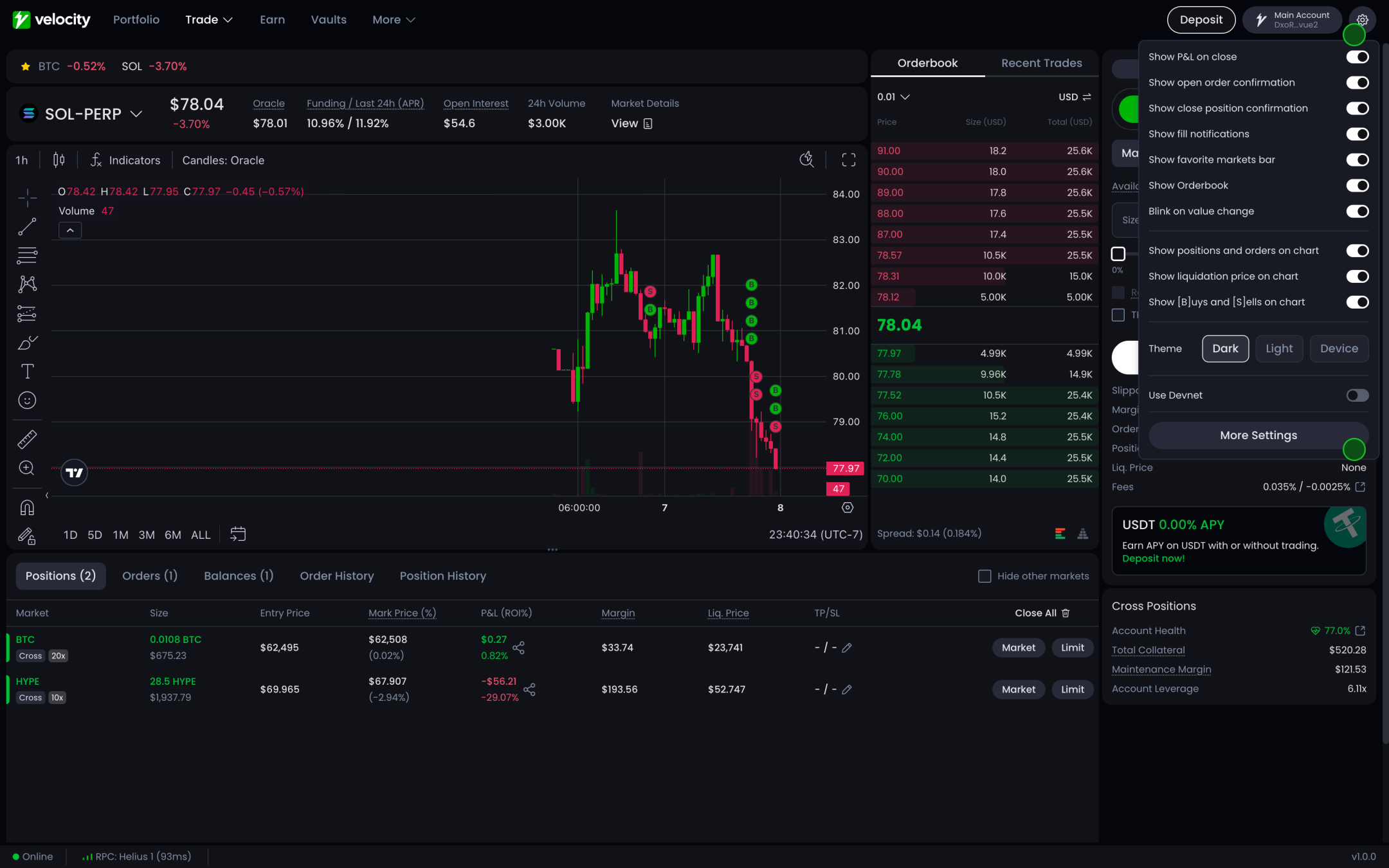
On the “Trade” tab click “Custom”. These settings allow users to customize how orders are executed on Velocity by setting specific auction parameters.
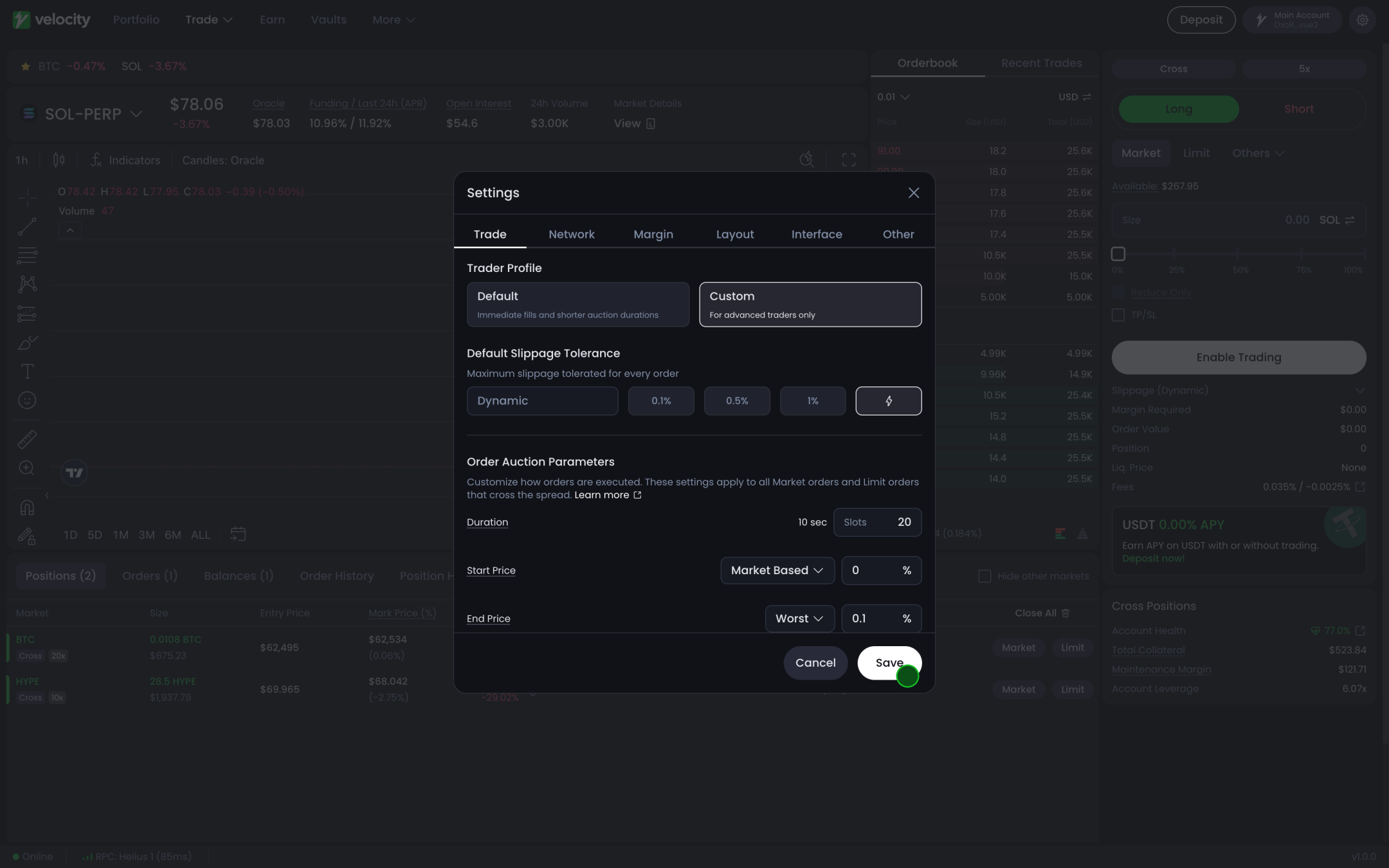
Customising auction parameters is recommended for advanced traders only.
How auctions work
With Velocity, users can determine the duration of their auction in ‘slots’, and set starting and ending prices based on the keeper network’s view of the DLOB.
The duration you request is a floor, not a fixed value. The program can lengthen it, and can move your start and end prices. See How the program sanitizes your auction below.
As an example, consider an order configured this way:
-
the user wants the auction to start at a price 0.05% better than the estimated fill price.
-
The auction will end at a price that’s the worst fill, but with a safety buffer of 0.05% slippage.
-
This entire process will take place over 20 slots, roughly 8 seconds at today’s 400ms slot time. Do not treat that conversion as fixed: Solana’s slot time is shrinking, and the program tracks the live value in
State.slotDurationMs. See Slot duration and wall-clock time. -
If the order isn’t fully executed within this time, any remaining amount can be filled at a price 0.5% worse than the estimated entry price up to the order’s expiry. By default, market orders remain valid for at least 30 seconds; if the auction runs longer, the expiry extends to roughly half the auction’s duration plus 10 seconds.
Additionally, user’s can specify their auctions as offsets from oracle price. This means during the auction (and at runtime) the auction is dynamically moving with the oracle prices as they update (increasing the chance of fair value fills).
Auctions for Limit Orders
A submitted limit order that crosses the local DLOB and/or AMM (and doesn’t have the post-only flag) carries its own auction, computed and stored as part of the same order, not placed separately or “first.” The auction’s start price follows the user-defined start-price rule, the same as a market order’s auction. The end price, however, defaults to the order’s own limit price rather than the UI’s slippage-tolerance setting, and the program clamps both start and end prices so the auction can never fill worse than that limit price.
Atomic Fills against Resting Liquidity
When ‘Fill against resting liquidity first’ is enabled, placed orders will go through the place_and_take_perp_order instruction. In Place And Take, a list of makers can be passed in with the user’s order and if the auction price at that point in the ramp crosses the makers’ limit price(s), the order will match. By default this atomic leg prices at the auction’s end price (100% of the way through the ramp), but the instruction accepts an optional auction-duration percentage that can price it earlier along the ramp instead, which is more aggressive for the taker. Any remaining amount of the order after this step will go through a typical auction (from start to end), unless IOC is enabled (in which case the order will cancel after attempting to fill vs makers). Note that Velocity’s AMM can also participate atomically in this first step alongside the makers, provided the AMM is currently available to fill (e.g. not paused); if the AMM is unavailable at that moment, it is excluded and only the maker orders fill atomically.
Now that you understand how an auction runs, here’s how to set one up and the fields you’ll see when doing so.
Start Price Fields
| Field | Description |
|---|---|
| Oracle Price | Current oracle price of the market |
| Mark Price | Current mark price, reflecting the protocol’s fair price based on oracle and market conditions |
| Best Bid/Ask | Use best bid/ask price |
| Est. Entry Price | Price includes estimated price impact on DLOB/AMM |
| Best Overall Price | Select best price of all of the above |
| Market Based | Dynamically derive the start price using live market conditions, prioritizing liquidity and execution quality |
For Large Size: It’s recommended to set a longer duration, “Use Oracle Offset”, and wider start, end buffers.
Building your own client? The DLOB server exposes the same derivation over HTTP at /auctionParams, including the marketBased start price. See Auction params for its full query surface.
How the program sanitizes your auction
The auction params you submit are a request. On every perp order placement the program rewrites them in place before the order is stored, so the auction that actually runs can differ from the one you sent. Nothing is rejected for this reason; the params are simply adjusted.
Start and end prices
- Missing prices are filled in. If you omit a start or end price, the program derives one from the market’s live conditions (oracle price, or your limit price for the end of a crossing limit order).
- Neither price may be worse than your own limit price. For a long order, both start and end are capped at the limit price; for a short, both are floored at it. Your limit price remains the worst price you can be filled at.
- A better start price wins. If the market-derived start price is better for you than the one you asked for, the program uses the better one. Signed-message orders get a 0.1% deadband here: the derived price has to beat your requested start by more than 0.1% before it replaces it.
The duration floor
The duration you request is treated as a floor, not a fixed value. The program computes its own minimum from two inputs, the auction’s price spread and the market’s contract tier, then stores max(your duration, that minimum).
The minimum is built in 400ms steps:
| Market contract tier | Steps granted per 1% of auction price spread | Wall clock per 1% of spread |
|---|---|---|
| A or B | 100 | 40s |
| C, Speculative, Highly Speculative, Isolated | 60 | 24s |
The step count is then clamped to the range 1 to 180, so the floor is never shorter than 400ms and never longer than 72 seconds, however wide the spread. Finally it is converted into an actual slot count using the live slot duration from State, rounding up so the auction never comes out shorter than the intended wall-clock time. Because Order.auctionDuration is a u8, the result is also capped at 255 slots.
The spread that feeds this is measured as a percentage of the oracle price, and it is the narrower of the range you requested and the range after price sanitization. Sanitizing your start price toward the market therefore cannot inflate your duration floor.
Worked example. You place a market order on a tier B market with an auction spanning 0.5% of the oracle price, and you request a 10 slot duration. The floor is 0.5 × 100 = 50 steps, which is 20 seconds, which is 50 slots at a 400ms slot time. Your order is stored with auctionDuration = 50. On a Speculative-tier market the same order would get 0.5 × 60 = 30 steps, 12 seconds, 30 slots.
Signed-message orders keep a tolerance
For signed-message (swift) orders only, the program leaves your requested duration alone when it is already within roughly 4 seconds’ worth of slots of the computed floor. Outside that tolerance, and for every non-signed order, the max(requested, floor) rule applies.
What this means in practice
- A short requested duration on a wide-spread auction will be lengthened, sometimes by a lot. Size your expectations off the floor, not off the number you sent.
- The floor is tier-dependent, so the same order behaves differently across markets. For the same spread a tier A or B market grants the longer floor; tail-tier markets grant less per 1% but usually have wider spreads to begin with. Read a market’s tier programmatically rather than assuming it.
- The floor is expressed in wall-clock time internally and only converted to slots at the end. As Solana’s slot time shrinks, the same order yields a larger slot count for the same number of seconds. See Slot duration and wall-clock time.